![Full Logo.png]](https://help.devicie.com/hs-fs/hubfs/Full%20Logo.png?height=30&name=Full%20Logo.png)
Overview:
Microsoft is retiring the original Secure Boot certificates introduced in 2011; they expire throughout 2026. Every Windows device that uses Secure Boot depends on these certificates, so IT must prepare managed fleets in advance. Secure Boot checks that boot components are signed and trusted before the OS starts; that trust is based on certificates in the device’s UEFI firmware. When the 2011 certificates expire, devices that have not transitioned to the new 2023 certificate chain may stop validating newer Secure Boot components, miss security updates, or in some cases fail to boot.
If devices do not receive the new Secure Boot certificates before the 2026 expiration, you can run into:
-
Blocked security updates: After the expiration window (e.g. from June 2026), devices may be unable to install Secure Boot–related updates, leaving boot components exposed.
-
Third-party trust: Software and drivers signed with the 2023 chain will not be trusted on devices that still only have the old certificates.
-
Windows Boot Manager: After October 2026, fixes for Windows Boot Manager may not apply to devices that have not transitioned.
-
Future compatibility: New Windows versions and security features may assume the new chain; devices on the old chain can hit compatibility or boot issues.
Deploying Secure Boot Certificate Updates
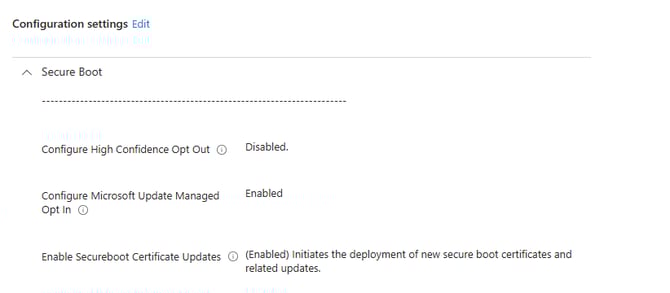
Navigate to https://intune.microsoft.com/ > Create > New Policy > Settings Catalog > Add Settings, and search for Secure Boot.
-
Configure High Confidence Opt Out = Disabled (Use opt-out only for specific exception devices that have been validated; do not enable it broadly or those devices will not get the required update).
-
Configure Microsoft Update Managed Opt In = Enabled (Microsoft controls when the certificate update is offered (recommended for most environments).
-
Enable Secureboot Certificate Updates = Enabled (Devices can receive updated Secure Boot certificates via Windows Update).
Deploying Allow Telemetry Policy
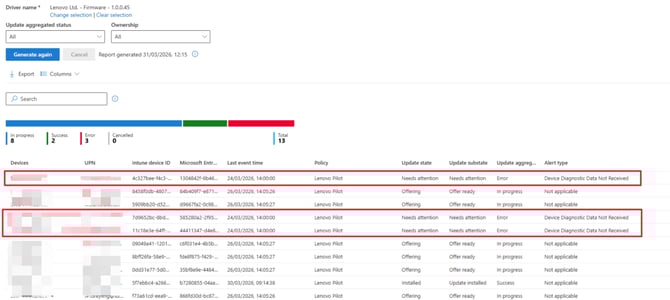
To ensure you do not see the Alert Type: Device Diagnostic Data Not Received when checking firmware updates in Reports for drivers. Ensure to read below to deploy the 'Allow Telemetry' to all Devices.
Navigate to https://intune.microsoft.com/ > Create > New Policy > Settings Catalog > Add Settings, and search for Telemetry.
-
Allow device name to be sent in Windows diagnostic data = Allowed
-
Allow Telemetry = Full
- Configure Telemetry Opt In Settings Ux = Disable Telemetry opt-in Settings
How to view Secure Boot Reports
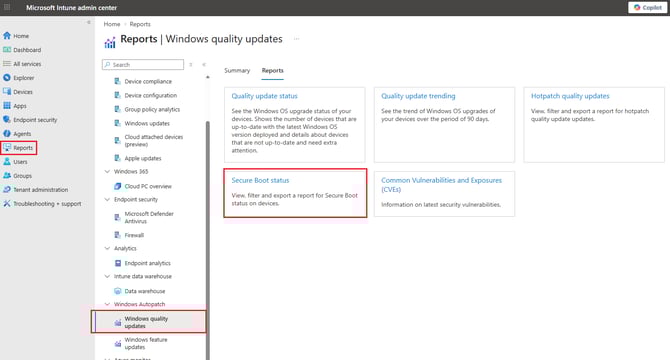
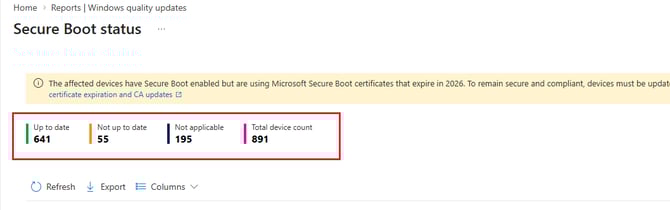
Navigate to https://intune.microsoft.com/ > Reports > Under Windows Autopatch > Windows quality updates > Reports > Secure Boot Status.
For devices where Secure Boot Enabled is set to 'No'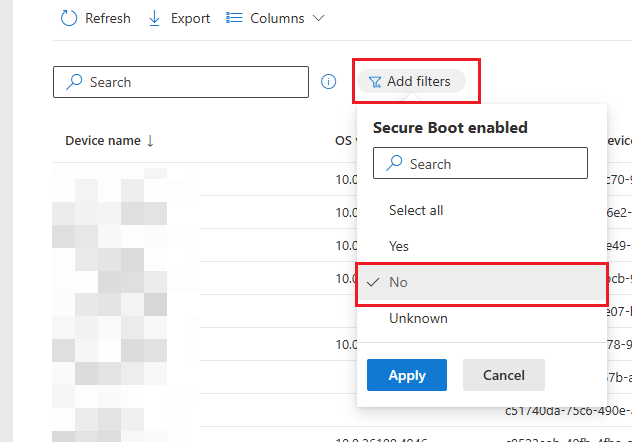
You can deploy the remediation script where:
Detect.ps1
#>
[CmdletBinding()]
param(
[Parameter(Mandatory = $false)]
[int]$FallbackDays = 30,
[Parameter(Mandatory = $false)]
[string]$TimestampRegPath = "HKLM:\SOFTWARE\Mindcore\Secureboot"
)
#region Logging Configuration
[string]$LogFile = "$env:ProgramData\Microsoft\IntuneManagementExtension\Logs\SecureBootCertificateUpdate.log"
[string]$ScriptName = "DETECT"
[int]$MaxLogSizeMB = 4
$script:LogBuffer = [System.Collections.Generic.List[string]]::new()
function Write-Log {
param(
[Parameter(Mandatory = $true)]
[string]$Message,
[Parameter(Mandatory = $false)]
[ValidateSet("INFO", "WARNING", "ERROR", "SUCCESS")]
[string]$Level = "INFO"
)
$TimeStamp = Get-Date -Format "yyyy-MM-dd HH:mm:ss"
$script:LogBuffer.Add("$TimeStamp [$ScriptName] [$Level] $Message")
}
function Flush-Log {
if ($script:LogBuffer.Count -eq 0) { return }
try {
$LogDir = Split-Path -Path $LogFile -Parent
if (-not (Test-Path $LogDir)) {
New-Item -Path $LogDir -ItemType Directory -Force | Out-Null
}
if (Test-Path $LogFile) {
$LogFileSizeMB = (Get-Item $LogFile).Length / 1MB
if ($LogFileSizeMB -ge $MaxLogSizeMB) {
$BackupLog = "$LogFile.old"
if (Test-Path $BackupLog) {
Remove-Item -Path $BackupLog -Force -ErrorAction SilentlyContinue
}
Rename-Item -Path $LogFile -NewName $BackupLog -Force -ErrorAction SilentlyContinue
$TimeStamp = Get-Date -Format "yyyy-MM-dd HH:mm:ss"
$script:LogBuffer.Insert(0, "$TimeStamp [SYSTEM] [INFO] Log rotated - Previous log archived to: $BackupLog")
}
}
Add-Content -Path $LogFile -Value $script:LogBuffer.ToArray() -ErrorAction SilentlyContinue
$script:LogBuffer.Clear()
}
catch {
# Silently fail if logging doesn't work - don't break script execution
}
}
#endregion
#region Functions
function Get-SecureBootStatus {
try {
$secureBootEnabled = Confirm-SecureBootUEFI
return $secureBootEnabled
}
catch {
# If Confirm-SecureBootUEFI fails, try registry method
try {
$regPath = "HKLM:\SYSTEM\CurrentControlSet\Control\SecureBoot\State"
if (Test-Path $regPath) {
$value = (Get-ItemProperty -Path $regPath -Name "UEFISecureBootEnabled" -ErrorAction SilentlyContinue).UEFISecureBootEnabled
return ($value -eq 1)
}
}
catch {
return $false
}
}
return $false
}
function Get-AvailableUpdatesStatus {
param([int]$Value)
switch ($Value) {
22852 { return "Not Started - All updates pending (0x5944)" }
16384 { return "Complete - All certificates applied (0x4000)" }
0 { return "No pending updates (0x0)" }
default { return "In Progress (0x$($Value.ToString('X')))" }
}
}
function Get-WindowsUEFICA2023Status {
param([int]$Value)
switch ($Value) {
0 { return "Not in DB" }
1 { return "In DB" }
2 { return "In DB and booting from 2023 signed boot manager" }
default { return "Unknown ($Value)" }
}
}
function Get-FallbackStatus {
param(
[string]$RegPath,
[int]$Threshold
)
$result = @{
TimestampExists = $false
OptInDate = $null
DaysElapsed = 0
DaysRemaining = $Threshold
IsActive = $false
}
try {
if (Test-Path $RegPath) {
$dateStr = (Get-ItemProperty -Path $RegPath -Name "ManagedOptInDate" -ErrorAction SilentlyContinue).ManagedOptInDate
if ($dateStr) {
$parsed = [datetime]::Parse($dateStr)
$elapsed = ((Get-Date) - $parsed).TotalDays
$result.TimestampExists = $true
$result.OptInDate = $parsed.ToString("yyyy-MM-dd HH:mm:ss")
$result.DaysElapsed = [math]::Floor($elapsed)
$result.DaysRemaining = [math]::Max(0, $Threshold - [math]::Floor($elapsed))
$result.IsActive = ($elapsed -ge $Threshold)
}
}
}
catch {
# If timestamp cannot be read, fallback is not active
}
return $result
}
function Get-SecureBootPayloadStatus {
$payloadPath = "$env:SystemRoot\System32\SecureBootUpdates"
$result = @{
FolderExists = $false
FileCount = 0
Files = @()
HasBinFiles = $false
IsHealthy = $false
}
try {
if (Test-Path $payloadPath) {
$result.FolderExists = $true
$files = Get-ChildItem -Path $payloadPath -File -ErrorAction SilentlyContinue
if ($files) {
$result.FileCount = $files.Count
$result.Files = $files | ForEach-Object { "$($_.Name) ($([math]::Round($_.Length / 1KB, 1))KB)" }
$result.HasBinFiles = ($files | Where-Object { $_.Extension -eq '.bin' }).Count -gt 0
$result.IsHealthy = $result.HasBinFiles
}
}
}
catch {
# Non-critical - continue without payload info
}
return $result
}
function Get-SecureBootTaskStatus {
$result = @{
TaskExists = $false
LastRunTime = $null
LastTaskResult = $null
NextRunTime = $null
ResultHex = $null
IsMissingFiles = $false
}
try {
$task = Get-ScheduledTask -TaskPath "\Microsoft\Windows\PI\" -TaskName "Secure-Boot-Update" -ErrorAction SilentlyContinue
if ($task) {
$result.TaskExists = $true
$taskInfo = Get-ScheduledTaskInfo -TaskPath "\Microsoft\Windows\PI\" -TaskName "Secure-Boot-Update" -ErrorAction SilentlyContinue
if ($taskInfo) {
$result.LastRunTime = $taskInfo.LastRunTime
$result.LastTaskResult = $taskInfo.LastTaskResult
$result.ResultHex = "0x$($taskInfo.LastTaskResult.ToString('X'))"
$result.NextRunTime = $taskInfo.NextRunTime
# 0x80070002 = ERROR_FILE_NOT_FOUND - missing payload binaries
$result.IsMissingFiles = ($taskInfo.LastTaskResult -eq 0x80070002)
}
}
}
catch {
# Non-critical - continue without task info
}
return $result
}
#endregion
#region Main Detection Logic
try {
Write-Log -Message "========== DETECTION STARTED ==========" -Level "INFO"
Write-Log -Message "Script Version: 5.0" -Level "INFO"
Write-Log -Message "Computer: $env:COMPUTERNAME | User: $env:USERNAME" -Level "INFO"
Write-Log -Message "PowerShell: $($PSVersionTable.PSVersion) | Process: $(if ([Environment]::Is64BitProcess) {'64-bit'} else {'32-bit'})" -Level "INFO"
# Check Secure Boot Status
Write-Log -Message "Checking Secure Boot status..." -Level "INFO"
$secureBootEnabled = Get-SecureBootStatus
# -- Stage 0: Secure Boot must be enabled --
if (-not $secureBootEnabled) {
Write-Log -Message "Secure Boot is DISABLED - Cannot apply certificate updates" -Level "ERROR"
Write-Log -Message "--- Stage 0 Diagnostics ---" -Level "INFO"
$sbStatePath = "HKLM:\SYSTEM\CurrentControlSet\Control\SecureBoot\State"
if (Test-Path $sbStatePath) {
$sbStateValue = (Get-ItemProperty -Path $sbStatePath -Name "UEFISecureBootEnabled" -ErrorAction SilentlyContinue).UEFISecureBootEnabled
Write-Log -Message " Firmware Mode: UEFI (SecureBoot State key exists)" -Level "INFO"
Write-Log -Message " UEFISecureBootEnabled: $sbStateValue" -Level "INFO"
Write-Log -Message " WHY: Device firmware supports Secure Boot but it is DISABLED in BIOS/UEFI settings" -Level "WARNING"
Write-Log -Message " NEXT STEPS: Enter BIOS/UEFI setup and enable Secure Boot under Security settings" -Level "WARNING"
}
else {
Write-Log -Message " Firmware Mode: Likely Legacy BIOS (SecureBoot State key does not exist)" -Level "WARNING"
Write-Log -Message " WHY: Legacy BIOS firmware does not support Secure Boot" -Level "ERROR"
Write-Log -Message " NEXT STEPS: Convert disk to GPT and switch firmware mode from Legacy to UEFI" -Level "ERROR"
Write-Log -Message " Reference: https://learn.microsoft.com/en-us/windows/deployment/mbr-to-gpt" -Level "INFO"
}
try {
$osDisk = Get-Disk -Number 0 -ErrorAction SilentlyContinue
if ($osDisk) {
Write-Log -Message " OS Disk Partition Style: $($osDisk.PartitionStyle)" -Level "INFO"
if ($osDisk.PartitionStyle -eq "MBR") {
Write-Log -Message " MBR disk detected - MBR2GPT conversion required before enabling UEFI mode" -Level "WARNING"
}
}
}
catch {
Write-Log -Message " OS Disk: Unable to determine partition style" -Level "WARNING"
}
try {
$biosInfo = Get-CimInstance -ClassName Win32_BIOS -ErrorAction SilentlyContinue
if ($biosInfo) {
Write-Log -Message " BIOS Manufacturer: $($biosInfo.Manufacturer)" -Level "INFO"
Write-Log -Message " BIOS Version: $($biosInfo.SMBIOSBIOSVersion)" -Level "INFO"
Write-Log -Message " BIOS Release Date: $($biosInfo.ReleaseDate)" -Level "INFO"
}
}
catch {}
Write-Log -Message "--- End Stage 0 Diagnostics ---" -Level "INFO"
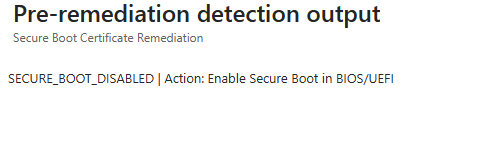
Write-Host "SECURE_BOOT_DISABLED | Action: Enable Secure Boot in BIOS/UEFI"
Write-Log -Message "Detection Result: NON-COMPLIANT - Stage 0 (exit 1)" -Level "WARNING"
Write-Log -Message "========== DETECTION COMPLETED ==========" -Level "INFO"
Flush-Log
exit 1
}
Write-Log -Message "Secure Boot is ENABLED" -Level "SUCCESS"
# -- Stage 1: Deployment must be triggered (AvailableUpdates set or timestamp exists) --
Write-Log -Message "Checking deployment status..." -Level "INFO"
$regPath = "HKLM:\SYSTEM\CurrentControlSet\Control\Secureboot"
$availableUpdatesValue = $null
if (Test-Path $regPath) {
$availableUpdatesValue = (Get-ItemProperty -Path $regPath -Name "AvailableUpdates" -ErrorAction SilentlyContinue).AvailableUpdates
}
# Check timestamp as durable marker (AvailableUpdates bits clear as task processes)
$deploymentTimestamp = $null
if (Test-Path $TimestampRegPath) {
$deploymentTimestamp = (Get-ItemProperty -Path $TimestampRegPath -Name "ManagedOptInDate" -ErrorAction SilentlyContinue).ManagedOptInDate
}
$deploymentTriggered = ($null -ne $availableUpdatesValue -and $availableUpdatesValue -ne 0) -or ($null -ne $deploymentTimestamp)
if (-not $deploymentTriggered) {
# Before triggering remediation, check if the device is already fully updated
$servicingPathEarly = "HKLM:\SYSTEM\CurrentControlSet\Control\SecureBoot\Servicing"
$uefiStatusEarly = (Get-ItemProperty -Path $servicingPathEarly -Name "UEFICA2023Status" -ErrorAction SilentlyContinue).UEFICA2023Status
if ($uefiStatusEarly -eq "Updated") {
Write-Log -Message "Deployment not triggered but device is already compliant (UEFICA2023Status=Updated)" -Level "SUCCESS"
Write-Host "COMPLIANT | Deployment:NotTriggered | UEFICA2023Status=Updated"
Write-Log -Message "Detection Result: COMPLIANT - Stage 5 (exit 0)" -Level "SUCCESS"
Write-Log -Message "========== DETECTION COMPLETED ==========" -Level "INFO"
Flush-Log
exit 0
}
Write-Log -Message "Deployment NOT TRIGGERED - Remediation required" -Level "WARNING"
Write-Log -Message "--- Stage 1 Analysis ---" -Level "INFO"
Write-Log -Message " Registry Path: $regPath" -Level "INFO"
Write-Log -Message " AvailableUpdates: $(if ($null -eq $availableUpdatesValue) {'<does not exist>'} else {"$availableUpdatesValue (0x$($availableUpdatesValue.ToString('X')))"})" -Level "INFO"
Write-Log -Message " Deployment Timestamp: $(if ($null -eq $deploymentTimestamp) {'<does not exist>'} else {$deploymentTimestamp})" -Level "INFO"
Write-Log -Message " Expected: AvailableUpdates = 0x5944 (22852)" -Level "INFO"
Write-Log -Message " WHY: AvailableUpdates has not been set to trigger Secure Boot certificate deployment" -Level "INFO"
Write-Log -Message " NEXT STEPS: The remediation script will automatically set AvailableUpdates = 0x5944. No manual action required." -Level "INFO"
Write-Log -Message "--- End Stage 1 Analysis ---" -Level "INFO"
Write-Host "DEPLOYMENT_NOT_TRIGGERED | Action: Remediation will set AvailableUpdates"
Write-Log -Message "Detection Result: NON-COMPLIANT - Stage 1 (exit 1)" -Level "WARNING"
Write-Log -Message "========== DETECTION COMPLETED ==========" -Level "INFO"
Flush-Log
exit 1
}
Write-Log -Message "Deployment TRIGGERED (AvailableUpdates: $(if ($null -ne $availableUpdatesValue) {"0x$($availableUpdatesValue.ToString('X'))"} else {'cleared'}) | Timestamp: $(if ($null -ne $deploymentTimestamp) {'exists'} else {'none'}))" -Level "SUCCESS"
# Check fallback timer status
$fallback = Get-FallbackStatus -RegPath $TimestampRegPath -Threshold $FallbackDays
if ($fallback.TimestampExists) {
Write-Log -Message "Fallback Timer: OptIn date=$($fallback.OptInDate) | Elapsed=$($fallback.DaysElapsed)d | Threshold=$($FallbackDays)d | Remaining=$($fallback.DaysRemaining)d | Active=$($fallback.IsActive)" -Level "INFO"
}
else {
Write-Log -Message "Fallback Timer: No ManagedOptInDate timestamp found (will be set by remediation script)" -Level "INFO"
}
# Check certificate deployment status
Write-Log -Message "Checking certificate update deployment status..." -Level "INFO"
$availableUpdates = $availableUpdatesValue
$servicingPath = "HKLM:\SYSTEM\CurrentControlSet\Control\SecureBoot\Servicing"
$ca2023Capable = (Get-ItemProperty -Path $servicingPath -Name "WindowsUEFICA2023Capable" -ErrorAction SilentlyContinue).WindowsUEFICA2023Capable
if ($null -ne $availableUpdates) {
$updateStatus = Get-AvailableUpdatesStatus -Value $availableUpdates
Write-Log -Message "AvailableUpdates: $updateStatus (0x$($availableUpdates.ToString('X')))" -Level "INFO"
}
else {
Write-Log -Message "AvailableUpdates: Key not present (normal before Windows Update detection)" -Level "INFO"
}
if ($null -ne $ca2023Capable) {
$ca2023Status = Get-WindowsUEFICA2023Status -Value $ca2023Capable
Write-Log -Message "WindowsUEFICA2023Capable: $ca2023Status ($ca2023Capable)" -Level "INFO"
}
else {
Write-Log -Message "WindowsUEFICA2023Capable: Key not present (normal before Windows Update processes)" -Level "INFO"
}
# Check UEFICA2023Status (primary compliance indicator per Microsoft guidance)
$uefiCA2023Status = (Get-ItemProperty -Path $servicingPath -Name "UEFICA2023Status" -ErrorAction SilentlyContinue).UEFICA2023Status
if ($null -ne $uefiCA2023Status) {
Write-Log -Message "UEFICA2023Status: $uefiCA2023Status" -Level "INFO"
}
else {
Write-Log -Message "UEFICA2023Status: Key not present (set when cert deployment processes)" -Level "INFO"
}
# Check UEFICA2023Error (indicates deployment failure)
$uefiError = (Get-ItemProperty -Path $servicingPath -Name "UEFICA2023Error" -ErrorAction SilentlyContinue).UEFICA2023Error
$uefiErrorEvent = (Get-ItemProperty -Path $servicingPath -Name "UEFICA2023ErrorEvent" -ErrorAction SilentlyContinue).UEFICA2023ErrorEvent
if ($null -ne $uefiError -and $uefiError -ne 0) {
Write-Log -Message "UEFICA2023Error: 0x$($uefiError.ToString('X')) ($uefiError) - certificate deployment encountered an error" -Level "ERROR"
if ($null -ne $uefiErrorEvent) {
Write-Log -Message "UEFICA2023ErrorEvent: $uefiErrorEvent (check Windows System Event Log)" -Level "ERROR"
}
Write-Log -Message " Reference: https://support.microsoft.com/topic/37e47cf8-608b-4a87-8175-bdead630eb69" -Level "WARNING"
}
# Build detail string for output (lightweight - no diagnostics needed)
$detailParts = @()
if ($null -ne $availableUpdates) {
$updateStatus = Get-AvailableUpdatesStatus -Value $availableUpdates
# Only include Updates detail if cert is not yet in DB (avoids confusion at Stage 4/5)
if ($null -eq $ca2023Capable -or $ca2023Capable -lt 1) {
$detailParts += "Updates:$updateStatus"
}
}
if ($null -ne $uefiCA2023Status) {
$detailParts += "Status:$uefiCA2023Status"
}
if ($null -ne $ca2023Capable) {
$ca2023Status = Get-WindowsUEFICA2023Status -Value $ca2023Capable
$detailParts += "CA2023:$ca2023Status"
}
if ($null -ne $uefiError -and $uefiError -ne 0) {
$detailParts += "Error:0x$($uefiError.ToString('X'))"
}
$details = $detailParts -join " | "
# -- Stage 5: COMPLIANT --
# UEFICA2023Status = "Updated" is the authoritative compliance indicator per Microsoft guidance
# WindowsUEFICA2023Capable = 2 alone means the DB key is in firmware but the transition may not be complete
if ($uefiCA2023Status -eq "Updated") {
Write-Log -Message "--- Stage 5: COMPLIANT ---" -Level "SUCCESS"
Write-Log -Message " Compliance method: UEFICA2023Status=Updated" -Level "SUCCESS"
if ($ca2023Capable -eq 2) {
Write-Log -Message " WindowsUEFICA2023Capable=2 (confirmed)" -Level "SUCCESS"
}
Write-Log -Message " The Secure Boot certificate transition is complete for this device" -Level "SUCCESS"
# Cleanup: remove tracking registry key now that transition is complete
if (Test-Path $TimestampRegPath) {
try {
Remove-Item -Path $TimestampRegPath -Recurse -Force -ErrorAction Stop
Write-Log -Message " Cleanup: Removed $TimestampRegPath (no longer needed)" -Level "SUCCESS"
}
catch {
Write-Log -Message " Cleanup: Could not remove $TimestampRegPath - $($_.Exception.Message)" -Level "WARNING"
}
}
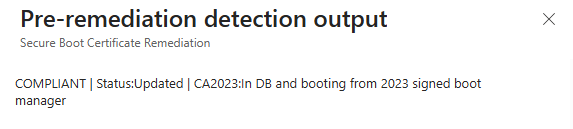
Write-Host "COMPLIANT | $details"
Write-Log -Message "Detection Result: COMPLIANT - Stage 5 (exit 0)" -Level "SUCCESS"
Write-Log -Message "========== DETECTION COMPLETED ==========" -Level "INFO"
Flush-Log
exit 0
}
# Check device attributes
$deviceAttribPath = "$servicingPath\DeviceAttributes"
if (Test-Path $deviceAttribPath) {
$manufacturer = (Get-ItemProperty -Path $deviceAttribPath -Name "OEMManufacturerName" -ErrorAction SilentlyContinue).OEMManufacturerName
$model = (Get-ItemProperty -Path $deviceAttribPath -Name "OEMModelNumber" -ErrorAction SilentlyContinue).OEMModelNumber
$firmwareVersion = (Get-ItemProperty -Path $deviceAttribPath -Name "FirmwareVersion" -ErrorAction SilentlyContinue).FirmwareVersion
$firmwareDate = (Get-ItemProperty -Path $deviceAttribPath -Name "FirmwareReleaseDate" -ErrorAction SilentlyContinue).FirmwareReleaseDate
if ($manufacturer) { Write-Log -Message "Device Manufacturer: $manufacturer" -Level "INFO" }
if ($model) { Write-Log -Message "Device Model: $model" -Level "INFO" }
if ($firmwareVersion) { Write-Log -Message "Firmware Version: $firmwareVersion" -Level "INFO" }
if ($firmwareDate) { Write-Log -Message "Firmware Release Date: $firmwareDate" -Level "INFO" }
}
# ===== DIAGNOSTIC DATA COLLECTION =====
Write-Log -Message "---------- DIAGNOSTIC DATA ----------" -Level "INFO"
# Secure Boot payload folder validation (diagnoses task error 0x80070002)
Write-Log -Message "--- SecureBootUpdates Payload Check ---" -Level "INFO"
$payload = Get-SecureBootPayloadStatus
if ($payload.FolderExists) {
Write-Log -Message " Payload Folder: EXISTS ($env:SystemRoot\System32\SecureBootUpdates)" -Level "INFO"
Write-Log -Message " File Count: $($payload.FileCount)" -Level "INFO"
if ($payload.FileCount -gt 0) {
foreach ($f in $payload.Files) {
Write-Log -Message " File: $f" -Level "INFO"
}
if ($payload.HasBinFiles) {
Write-Log -Message " Payload Health: HEALTHY - .bin payload files present" -Level "SUCCESS"
}
else {
Write-Log -Message " Payload Health: WARNING - folder has files but no .bin payloads" -Level "WARNING"
}
}
else {
Write-Log -Message " Payload Health: EMPTY - no files in payload folder" -Level "WARNING"
Write-Log -Message " This will cause the Secure-Boot-Update task to fail with 0x80070002" -Level "WARNING"
Write-Log -Message " FIX: Install the latest cumulative update, or use WinCsFlags.exe if available" -Level "WARNING"
}
}
else {
Write-Log -Message " Payload Folder: MISSING ($env:SystemRoot\System32\SecureBootUpdates)" -Level "WARNING"
Write-Log -Message " This will cause the Secure-Boot-Update task to fail with 0x80070002" -Level "WARNING"
Write-Log -Message " FIX: Install the latest cumulative update, or use WinCsFlags.exe if available" -Level "WARNING"
}
Write-Log -Message "--- End Payload Check ---" -Level "INFO"
# Scheduled task last-run-result inspection
Write-Log -Message "--- Secure-Boot-Update Task Status ---" -Level "INFO"
$taskStatus = Get-SecureBootTaskStatus
if ($taskStatus.TaskExists) {
Write-Log -Message " Task: Found" -Level "INFO"
if ($null -ne $taskStatus.LastRunTime -and $taskStatus.LastRunTime.Year -gt 2000) {
Write-Log -Message " Last Run: $($taskStatus.LastRunTime.ToString('yyyy-MM-dd HH:mm:ss'))" -Level "INFO"
}
else {
Write-Log -Message " Last Run: Never" -Level "INFO"
}
Write-Log -Message " Last Result: $($taskStatus.ResultHex) ($($taskStatus.LastTaskResult))" -Level "INFO"
if ($taskStatus.IsMissingFiles) {
Write-Log -Message " ALERT: Task failed with 0x80070002 (ERROR_FILE_NOT_FOUND)" -Level "ERROR"
Write-Log -Message " ROOT CAUSE: Missing certificate payload files in SecureBootUpdates folder" -Level "ERROR"
Write-Log -Message " FIX: Install the latest cumulative update to restore payload files, or use WinCsFlags.exe" -Level "ERROR"
}
elseif ($taskStatus.LastTaskResult -ne 0) {
Write-Log -Message " WARNING: Task exited with non-zero result $($taskStatus.ResultHex)" -Level "WARNING"
}
else {
Write-Log -Message " Task result: Success (0x0)" -Level "SUCCESS"
}
if ($null -ne $taskStatus.NextRunTime -and $taskStatus.NextRunTime.Year -gt 2000) {
Write-Log -Message " Next Run: $($taskStatus.NextRunTime.ToString('yyyy-MM-dd HH:mm:ss'))" -Level "INFO"
}
}
else {
Write-Log -Message " Task: NOT FOUND (requires July 2024+ cumulative update)" -Level "WARNING"
}
Write-Log -Message "--- End Task Status ---" -Level "INFO"
# WinCS (WinCsFlags.exe) availability check
Write-Log -Message "--- WinCS Availability ---" -Level "INFO"
$winCsPath = "$env:SystemRoot\System32\WinCsFlags.exe"
$winCsAvailable = Test-Path $winCsPath
if ($winCsAvailable) {
Write-Log -Message " WinCsFlags.exe: AVAILABLE ($winCsPath)" -Level "SUCCESS"
try {
$winCsOutput = & $winCsPath /query --key F33E0C8E002 2>&1
$winCsOutputStr = ($winCsOutput | Out-String).Trim()
foreach ($line in ($winCsOutputStr -split "`n")) {
$trimmed = $line.Trim()
if ($trimmed) {
Write-Log -Message " WinCS: $trimmed" -Level "INFO"
}
}
}
catch {
Write-Log -Message " WinCS query failed: $($_.Exception.Message)" -Level "WARNING"
}
}
else {
Write-Log -Message " WinCsFlags.exe: NOT AVAILABLE (requires Oct/Nov 2025+ cumulative update)" -Level "INFO"
}
Write-Log -Message "--- End WinCS Availability ---" -Level "INFO"
# UEFI DB firmware-level certificate verification
Write-Log -Message "--- UEFI DB Certificate Verification ---" -Level "INFO"
try {
$dbBytes = (Get-SecureBootUEFI db -ErrorAction Stop).bytes
$dbContent = [System.Text.Encoding]::ASCII.GetString($dbBytes)
$hasCA2023InDB = $dbContent -match 'Windows UEFI CA 2023'
if ($hasCA2023InDB) {
Write-Log -Message " UEFI DB: Windows UEFI CA 2023 certificate FOUND in firmware DB" -Level "SUCCESS"
}
else {
Write-Log -Message " UEFI DB: Windows UEFI CA 2023 certificate NOT FOUND in firmware DB" -Level "INFO"
}
}
catch {
Write-Log -Message " UEFI DB: Unable to query firmware - $($_.Exception.Message)" -Level "WARNING"
}
Write-Log -Message "--- End UEFI DB Verification ---" -Level "INFO"
# OS version and last boot time
$osInfo = Get-CimInstance -ClassName Win32_OperatingSystem
$osVersion = $osInfo.Caption
$osBuild = $osInfo.BuildNumber
Write-Log -Message "OS: $osVersion (Build $osBuild)" -Level "INFO"
if ($osVersion -like "*Windows 10*") {
Write-Log -Message "WARNING: Windows 10 support ended October 2025. Consider upgrading to Windows 11 or ESU." -Level "WARNING"
}
$lastBoot = $osInfo.LastBootUpTime
$uptime = (Get-Date) - $lastBoot
Write-Log -Message "Last Boot: $($lastBoot.ToString('yyyy-MM-dd HH:mm:ss')) | Uptime: $([math]::Floor($uptime.TotalDays))d $($uptime.Hours)h $($uptime.Minutes)m" -Level "INFO"
# TPM status
try {
$tpm = Get-CimInstance -Namespace "root\cimv2\Security\MicrosoftTpm" -ClassName Win32_Tpm -ErrorAction Stop
if ($tpm) {
Write-Log -Message "TPM: Present | Enabled: $($tpm.IsEnabled_InitialValue) | Activated: $($tpm.IsActivated_InitialValue) | Spec: $($tpm.SpecVersion)" -Level "INFO"
}
else {
Write-Log -Message "TPM: Not found" -Level "WARNING"
}
}
catch {
Write-Log -Message "TPM: Unable to query - $($_.Exception.Message)" -Level "WARNING"
}
# BitLocker status on OS drive
try {
$blVolume = Get-CimInstance -Namespace "root\cimv2\Security\MicrosoftVolumeEncryption" -ClassName Win32_EncryptableVolume -Filter "DriveLetter='$env:SystemDrive'" -ErrorAction Stop
if ($blVolume) {
$blProtection = switch ($blVolume.ProtectionStatus) { 0 { "OFF" } 1 { "ON" } 2 { "UNKNOWN" } default { "Unknown ($($blVolume.ProtectionStatus))" } }
$blConversion = switch ($blVolume.ConversionStatus) { 0 { "FullyDecrypted" } 1 { "FullyEncrypted" } 2 { "EncryptionInProgress" } 3 { "DecryptionInProgress" } 4 { "EncryptionPaused" } 5 { "DecryptionPaused" } default { "Unknown ($($blVolume.ConversionStatus))" } }
Write-Log -Message "BitLocker ($env:SystemDrive): Protection=$blProtection | Status=$blConversion" -Level "INFO"
if ($blProtection -eq "ON") {
Write-Log -Message "BitLocker NOTE: Secure Boot cert changes may trigger BitLocker recovery key prompt on next reboot" -Level "WARNING"
}
}
else {
Write-Log -Message "BitLocker ($env:SystemDrive): Not encrypted or not available" -Level "INFO"
}
}
catch {
Write-Log -Message "BitLocker: Unable to query - $($_.Exception.Message)" -Level "WARNING"
}
# Windows Update service health
try {
$wuService = Get-Service -Name wuauserv -ErrorAction Stop
Write-Log -Message "Windows Update Service: Status=$($wuService.Status) | StartType=$($wuService.StartType)" -Level "INFO"
if ($wuService.Status -ne 'Running' -and $wuService.Status -ne 'Stopped') {
Write-Log -Message "WU Service WARNING: Service is in unexpected state '$($wuService.Status)'" -Level "WARNING"
}
}
catch {
Write-Log -Message "Windows Update Service: Unable to query - $($_.Exception.Message)" -Level "WARNING"
}
# Last Windows Update scan and install times
try {
$autoUpdate = New-Object -ComObject Microsoft.Update.AutoUpdate -ErrorAction Stop
$lastSearch = $autoUpdate.Results.LastSearchSuccessDate
if ($lastSearch -and $lastSearch.Year -gt 2000) {
$searchAge = (Get-Date) - $lastSearch
Write-Log -Message "Last WU Scan: $($lastSearch.ToString('yyyy-MM-dd HH:mm:ss')) ($([math]::Floor($searchAge.TotalHours))h ago)" -Level "INFO"
if ($searchAge.TotalDays -gt 7) {
Write-Log -Message "WU Scan WARNING: Last successful scan was over 7 days ago" -Level "WARNING"
}
}
else {
Write-Log -Message "Last WU Scan: No successful scan on record" -Level "WARNING"
}
$lastInstall = $autoUpdate.Results.LastInstallationSuccessDate
if ($lastInstall -and $lastInstall.Year -gt 2000) {
Write-Log -Message "Last WU Install: $($lastInstall.ToString('yyyy-MM-dd HH:mm:ss'))" -Level "INFO"
}
}
catch {
Write-Log -Message "Windows Update COM: Unable to query - $($_.Exception.Message)" -Level "WARNING"
}
# Pending reboot indicators
$pendingRebootReasons = @()
if (Test-Path "HKLM:\SOFTWARE\Microsoft\Windows\CurrentVersion\Component Based Servicing\RebootPending") {
$pendingRebootReasons += "CBS-RebootPending"
}
if (Test-Path "HKLM:\SOFTWARE\Microsoft\Windows\CurrentVersion\WindowsUpdate\Auto Update\RebootRequired") {
$pendingRebootReasons += "WU-RebootRequired"
}
$pfro = (Get-ItemProperty "HKLM:\SYSTEM\CurrentControlSet\Control\Session Manager" -Name "PendingFileRenameOperations" -ErrorAction SilentlyContinue).PendingFileRenameOperations
if ($pfro) {
$pendingRebootReasons += "PendingFileRename"
}
if (Test-Path "HKLM:\SOFTWARE\Microsoft\Windows\CurrentVersion\WindowsUpdate\Auto Update\PostRebootReporting") {
$pendingRebootReasons += "WU-PostRebootReporting"
}
if ($pendingRebootReasons.Count -gt 0) {
Write-Log -Message "Pending Reboot: YES - Sources: $($pendingRebootReasons -join ', ')" -Level "WARNING"
}
else {
Write-Log -Message "Pending Reboot: No pending reboot detected" -Level "INFO"
}
# Full Secure Boot registry dump
Write-Log -Message "--- Secure Boot Registry Dump ---" -Level "INFO"
$sbDumpPath = "HKLM:\SYSTEM\CurrentControlSet\Control\Secureboot"
if (Test-Path $sbDumpPath) {
$sbDumpProps = Get-ItemProperty -Path $sbDumpPath -ErrorAction SilentlyContinue
$sbDumpProps.PSObject.Properties | Where-Object { $_.Name -notlike "PS*" } | ForEach-Object {
if ($_.Value -is [int]) {
Write-Log -Message " Secureboot\$($_.Name) = $($_.Value) (0x$($_.Value.ToString('X')))" -Level "INFO"
}
elseif ($_.Value -is [byte[]]) {
Write-Log -Message " Secureboot\$($_.Name) = [byte[]] Length=$($_.Value.Length)" -Level "INFO"
}
else {
Write-Log -Message " Secureboot\$($_.Name) = $($_.Value)" -Level "INFO"
}
}
}
else {
Write-Log -Message " Secureboot key not found at $sbDumpPath" -Level "WARNING"
}
$sbServicingDump = "HKLM:\SYSTEM\CurrentControlSet\Control\SecureBoot\Servicing"
if (Test-Path $sbServicingDump) {
$svcDumpProps = Get-ItemProperty -Path $sbServicingDump -ErrorAction SilentlyContinue
$svcDumpProps.PSObject.Properties | Where-Object { $_.Name -notlike "PS*" } | ForEach-Object {
if ($_.Value -is [int]) {
Write-Log -Message " Servicing\$($_.Name) = $($_.Value) (0x$($_.Value.ToString('X')))" -Level "INFO"
}
elseif ($_.Value -is [byte[]]) {
Write-Log -Message " Servicing\$($_.Name) = [byte[]] Length=$($_.Value.Length)" -Level "INFO"
}
else {
Write-Log -Message " Servicing\$($_.Name) = $($_.Value)" -Level "INFO"
}
}
}
else {
Write-Log -Message " SecureBoot\Servicing key does not exist (normal before WU processes cert updates)" -Level "INFO"
}
Write-Log -Message "--- End Registry Dump ---" -Level "INFO"
# Secure Boot event log harvesting
Write-Log -Message "--- Secure Boot Event Log ---" -Level "INFO"
$sbEventIds = @(1036, 1043, 1044, 1045, 1795, 1801, 1808)
try {
$sbEvents = Get-WinEvent -FilterHashtable @{
LogName = 'Microsoft-Windows-Kernel-Boot/Operational', 'System'
Id = $sbEventIds
} -MaxEvents 20 -ErrorAction SilentlyContinue
if ($sbEvents -and $sbEvents.Count -gt 0) {
$grouped = $sbEvents | Group-Object -Property Id
foreach ($group in $grouped) {
$latest = $group.Group | Sort-Object TimeCreated -Descending | Select-Object -First 1
$msgPreview = ($latest.Message -split "`n")[0]
if ($msgPreview.Length -gt 120) { $msgPreview = $msgPreview.Substring(0, 120) + "..." }
Write-Log -Message " Event $($group.Name): Last=$($latest.TimeCreated.ToString('yyyy-MM-dd HH:mm:ss')) Count=$($group.Count) [$msgPreview]" -Level "INFO"
}
}
else {
Write-Log -Message " No Secure Boot events (IDs: $($sbEventIds -join ',')) found in recent logs" -Level "INFO"
}
}
catch {
Write-Log -Message " Event Log query failed: $($_.Exception.Message)" -Level "WARNING"
}
Write-Log -Message "--- End Event Log ---" -Level "INFO"
Write-Log -Message "---------- END DIAGNOSTIC DATA ----------" -Level "INFO"
# -- Stages 2-4: Configured but not yet fully transitioned (all exit 1) --
# The remediation script will see OptIn is already set and may trigger direct fallback.
# Add payload, task, WinCS and fallback timer info to detail string for non-compliant stages
if (-not $payload.IsHealthy) {
$details += " | Payload:MISSING"
}
if ($taskStatus.TaskExists -and $taskStatus.IsMissingFiles) {
$details += " | Task:0x80070002"
}
elseif ($taskStatus.TaskExists -and $taskStatus.LastTaskResult -eq 0) {
$details += " | Task:OK"
}
if ($winCsAvailable) {
$details += " | WinCS:Available"
}
if ($fallback.TimestampExists) {
if ($fallback.IsActive) {
$details += " | Fallback:ACTIVE($($fallback.DaysElapsed)d)"
}
else {
$details += " | Fallback:$($fallback.DaysRemaining)d remaining"
}
}
# Stage 4: CA2023 cert is in UEFI DB but device hasn't rebooted to use it yet
if ($ca2023Capable -eq 1) {
Write-Log -Message "--- Stage 4 Analysis ---" -Level "INFO"
Write-Log -Message " WHY: The Windows UEFI CA 2023 certificate has been written to the UEFI Secure Boot DB" -Level "INFO"
Write-Log -Message " WHY: but the device has not yet rebooted to load the new 2023-signed boot manager" -Level "INFO"
Write-Log -Message " Last Boot: $($lastBoot.ToString('yyyy-MM-dd HH:mm:ss')) ($([math]::Floor($uptime.TotalDays)) days, $($uptime.Hours)h ago)" -Level "INFO"
if ($pendingRebootReasons.Count -gt 0) {
Write-Log -Message " Pending Reboot Detected: $($pendingRebootReasons -join ', ')" -Level "WARNING"
}
else {
Write-Log -Message " Pending Reboot: No reboot indicators found - a reboot is still required to activate the new boot manager" -Level "INFO"
}
Write-Log -Message " NEXT STEPS: Reboot the device. After reboot, the boot manager will use the 2023 certificate chain." -Level "WARNING"
Write-Log -Message " NEXT STEPS: If the device has been rebooted recently and is still at Stage 4, check BitLocker recovery key availability." -Level "WARNING"
if ($fallback.TimestampExists -and $fallback.IsActive) {
Write-Log -Message " FALLBACK: Timer exceeded ($($fallback.DaysElapsed)d > $($FallbackDays)d) - remediation will use direct method on next run" -Level "WARNING"
}
elseif ($fallback.TimestampExists) {
Write-Log -Message " FALLBACK: $($fallback.DaysRemaining) days until direct method fallback activates" -Level "INFO"
}
Write-Log -Message "--- End Stage 4 Analysis ---" -Level "INFO"
Write-Host "CONFIGURED_CA2023_IN_DB | $details | Action: Reboot to complete transition"
Write-Log -Message "Detection Result: NON-COMPLIANT - Stage 4 (exit 1)" -Level "WARNING"
Write-Log -Message "========== DETECTION COMPLETED ==========" -Level "INFO"
Flush-Log
exit 1
}
# Stage 3: Certificate updates are actively being applied by Windows Update
if ($null -ne $availableUpdates -and $availableUpdates -ne 0 -and $availableUpdates -ne 22852) {
Write-Log -Message "--- Stage 3 Analysis ---" -Level "INFO"
Write-Log -Message " WHY: Windows Update is actively processing Secure Boot certificate updates" -Level "INFO"
Write-Log -Message " WHY: AvailableUpdates = 0x$($availableUpdates.ToString('X')) ($availableUpdates) indicates partial certificate deployment" -Level "INFO"
Write-Log -Message " WHY: Target value is 0x4000 (16384) = all certificates applied" -Level "INFO"
if ($availableUpdates -eq 0x4104) {
Write-Log -Message " STUCK STATE: AvailableUpdates = 0x4104 - device cannot progress past KEK certificate deployment" -Level "ERROR"
Write-Log -Message " ROOT CAUSE: The 0x0004 bit (KEK) is not clearing even after restarts" -Level "ERROR"
Write-Log -Message " ACTION: Check with your OEM for a firmware update that supports the new KEK certificate" -Level "ERROR"
Write-Log -Message " Reference: https://learn.microsoft.com/windows-hardware/manufacture/desktop/windows-secure-boot-key-creation-and-management-guidance" -Level "ERROR"
}
if ($pendingRebootReasons.Count -gt 0) {
Write-Log -Message " Pending Reboot: $($pendingRebootReasons -join ', ') - a reboot may be required to continue WU processing" -Level "WARNING"
}
Write-Log -Message " NEXT STEPS: Allow Windows Update to complete. This typically resolves after 1-2 quality update cycles." -Level "INFO"
Write-Log -Message " NEXT STEPS: If stuck here for >30 days, check Windows Update health and run 'usoclient StartScan'" -Level "WARNING"
if ($fallback.TimestampExists -and $fallback.IsActive) {
Write-Log -Message " FALLBACK: Timer exceeded ($($fallback.DaysElapsed)d > $($FallbackDays)d) - remediation will use direct method on next run" -Level "WARNING"
}
elseif ($fallback.TimestampExists) {
Write-Log -Message " FALLBACK: $($fallback.DaysRemaining) days until direct method fallback activates" -Level "INFO"
}
Write-Log -Message "--- End Stage 3 Analysis ---" -Level "INFO"
Write-Host "CONFIGURED_UPDATE_IN_PROGRESS | $details | Action: Waiting for Windows Update"
Write-Log -Message "Detection Result: NON-COMPLIANT - Stage 3 (exit 1)" -Level "WARNING"
Write-Log -Message "========== DETECTION COMPLETED ==========" -Level "INFO"
Flush-Log
exit 1
}
# Stage 2: Deployment triggered but Secure-Boot-Update task hasn't started processing yet
Write-Log -Message "--- Stage 2 Analysis ---" -Level "INFO"
Write-Log -Message " WHY: AvailableUpdates = 0x5944 was set but the Secure-Boot-Update task has not yet processed the certificate updates" -Level "INFO"
if ($null -eq $availableUpdates) {
Write-Log -Message " WHY: AvailableUpdates key does not exist yet - Windows Update has not scanned for Secure Boot cert updates" -Level "INFO"
}
else {
Write-Log -Message " WHY: AvailableUpdates = 0x$($availableUpdates.ToString('X')) ($availableUpdates) - waiting for WU to begin processing" -Level "INFO"
}
if ($null -eq $ca2023Capable) {
Write-Log -Message " WHY: WindowsUEFICA2023Capable key does not exist yet - normal before Windows Update processes" -Level "INFO"
}
else {
Write-Log -Message " WHY: WindowsUEFICA2023Capable = $ca2023Capable (0 = Not in DB)" -Level "INFO"
}
Write-Log -Message " NEXT STEPS: Ensure device is connected to the internet and Windows Update service is running" -Level "INFO"
Write-Log -Message " NEXT STEPS: Certificate updates are delivered through cumulative quality updates" -Level "INFO"
Write-Log -Message " NEXT STEPS: If stuck here for >14 days, run 'usoclient StartScan' or check WU policy/WSUS configuration" -Level "WARNING"
if ($fallback.TimestampExists -and $fallback.IsActive) {
Write-Log -Message " FALLBACK: Timer exceeded ($($fallback.DaysElapsed)d > $($FallbackDays)d) - remediation will use direct method on next run" -Level "WARNING"
}
elseif ($fallback.TimestampExists) {
Write-Log -Message " FALLBACK: $($fallback.DaysRemaining) days until direct method fallback activates" -Level "INFO"
}
Write-Log -Message "--- End Stage 2 Analysis ---" -Level "INFO"
Write-Host "CONFIGURED_AWAITING_UPDATE | $details | Action: Waiting for Windows Update scan"
Write-Log -Message "Detection Result: NON-COMPLIANT - Stage 2 (exit 1)" -Level "WARNING"
Write-Log -Message "========== DETECTION COMPLETED ==========" -Level "INFO"
Flush-Log
exit 1
}
catch {
Write-Log -Message "Unexpected error during detection: $($_.Exception.Message)" -Level "ERROR"
Write-Log -Message "Stack Trace: $($_.ScriptStackTrace)" -Level "ERROR"
Write-Host "ERROR: $($_.Exception.Message)"
Write-Log -Message "Detection Result: ERROR (exit 1)" -Level "ERROR"
Write-Log -Message "========== DETECTION COMPLETED ==========" -Level "INFO"
Flush-Log
exit 1
}
#endregion
Remediation.ps1
#>
[CmdletBinding()]
param(
[Parameter(Mandatory = $false)]
[int]$FallbackDays = 30,
[Parameter(Mandatory = $false)]
[string]$TimestampRegPath = "HKLM:\SOFTWARE\Mindcore\Secureboot"
)
#region Logging Configuration
[string]$LogFile = "$env:ProgramData\Microsoft\IntuneManagementExtension\Logs\SecureBootCertificateUpdate.log"
[string]$ScriptName = "REMEDIATE"
[int]$MaxLogSizeMB = 4
$script:LogBuffer = [System.Collections.Generic.List[string]]::new()
function Write-Log {
param(
[Parameter(Mandatory = $true)]
[string]$Message,
[Parameter(Mandatory = $false)]
[ValidateSet("INFO", "WARNING", "ERROR", "SUCCESS")]
[string]$Level = "INFO"
)
$TimeStamp = Get-Date -Format "yyyy-MM-dd HH:mm:ss"
$script:LogBuffer.Add("$TimeStamp [$ScriptName] [$Level] $Message")
}
function Flush-Log {
if ($script:LogBuffer.Count -eq 0) { return }
try {
$LogDir = Split-Path -Path $LogFile -Parent
if (-not (Test-Path $LogDir)) {
New-Item -Path $LogDir -ItemType Directory -Force | Out-Null
}
if (Test-Path $LogFile) {
$LogFileSizeMB = (Get-Item $LogFile).Length / 1MB
if ($LogFileSizeMB -ge $MaxLogSizeMB) {
$BackupLog = "$LogFile.old"
if (Test-Path $BackupLog) {
Remove-Item -Path $BackupLog -Force -ErrorAction SilentlyContinue
}
Rename-Item -Path $LogFile -NewName $BackupLog -Force -ErrorAction SilentlyContinue
$TimeStamp = Get-Date -Format "yyyy-MM-dd HH:mm:ss"
$script:LogBuffer.Insert(0, "$TimeStamp [SYSTEM] [INFO] Log rotated - Previous log archived to: $BackupLog")
}
}
Add-Content -Path $LogFile -Value $script:LogBuffer.ToArray() -ErrorAction SilentlyContinue
$script:LogBuffer.Clear()
}
catch {
# Silently fail if logging doesn't work - don't break script execution
}
}
#endregion
#region Functions
function Get-SecureBootStatus {
try {
$secureBootEnabled = Confirm-SecureBootUEFI
return $secureBootEnabled
}
catch {
# If Confirm-SecureBootUEFI fails, try registry method
try {
$regPath = "HKLM:\SYSTEM\CurrentControlSet\Control\SecureBoot\State"
if (Test-Path $regPath) {
$value = (Get-ItemProperty -Path $regPath -Name "UEFISecureBootEnabled" -ErrorAction SilentlyContinue).UEFISecureBootEnabled
return ($value -eq 1)
}
}
catch {
return $false
}
}
return $false
}
function Get-FirmwareAgeStatus {
$result = @{
Manufacturer = "Unknown"
Model = "Unknown"
BiosVersion = "Unknown"
ReleaseDate = $null
AgeDays = $null
IsStale = $false
UpdateGuidance = "Check your device manufacturer's support site for firmware updates."
}
try {
$bios = Get-CimInstance -ClassName Win32_BIOS -ErrorAction Stop
$cs = Get-CimInstance -ClassName Win32_ComputerSystem -ErrorAction Stop
$result.Manufacturer = $(if ($cs.Manufacturer) { $cs.Manufacturer } else { "Unknown" }).Trim()
$result.Model = $(if ($cs.Model) { $cs.Model } else { "Unknown" }).Trim()
$result.BiosVersion = $bios.SMBIOSBIOSVersion
if ($null -ne $bios.ReleaseDate) {
$result.ReleaseDate = $bios.ReleaseDate
$result.AgeDays = [math]::Floor(((Get-Date) - $bios.ReleaseDate).TotalDays)
$result.IsStale = ($result.AgeDays -gt 365)
}
# OEM-specific update guidance
$mfr = $result.Manufacturer.ToUpper()
switch -Wildcard ($mfr) {
"LENOVO*" {
$result.UpdateGuidance = "Update firmware via Lenovo Vantage, SCCM driver packs, or https://support.lenovo.com"
}
"DELL*" {
$result.UpdateGuidance = "Update firmware via Dell Command Update, Dell Support Assist, or https://www.dell.com/support"
}
{ $_ -like "HP*" -or $_ -like "HEWLETT*" } {
$result.UpdateGuidance = "Update firmware via HP Support Assistant, HP Image Assistant, or https://support.hp.com"
}
"MICROSOFT*" {
$result.UpdateGuidance = "Update firmware via Windows Update (Surface drivers) or https://www.microsoft.com/surface/support"
}
}
}
catch {
# If WMI fails, return unknown - do not block remediation on query failure
}
return $result
}
function Get-SecureBootPayloadStatus {
$payloadPath = "$env:SystemRoot\System32\SecureBootUpdates"
$result = @{
FolderExists = $false
FileCount = 0
Files = @()
HasBinFiles = $false
IsHealthy = $false
}
try {
if (Test-Path $payloadPath) {
$result.FolderExists = $true
$files = Get-ChildItem -Path $payloadPath -File -ErrorAction SilentlyContinue
if ($files) {
$result.FileCount = $files.Count
$result.Files = $files | ForEach-Object { "$($_.Name) ($([math]::Round($_.Length / 1KB, 1))KB)" }
$result.HasBinFiles = ($files | Where-Object { $_.Extension -eq '.bin' }).Count -gt 0
$result.IsHealthy = $result.HasBinFiles
}
}
}
catch {
# Non-critical - continue without payload info
}
return $result
}
#endregion
#region Main Remediation Logic
try {
Write-Log -Message "========== REMEDIATION STARTED ==========" -Level "INFO"
Write-Log -Message "Script Version: 5.0" -Level "INFO"
Write-Log -Message "Computer: $env:COMPUTERNAME | User: $env:USERNAME" -Level "INFO"
Write-Log -Message "PowerShell: $($PSVersionTable.PSVersion) | Process: $(if ([Environment]::Is64BitProcess) {'64-bit'} else {'32-bit'})" -Level "INFO"
# Verify Secure Boot is enabled
Write-Log -Message "Verifying Secure Boot status..." -Level "INFO"
$secureBootEnabled = Get-SecureBootStatus
if (-not $secureBootEnabled) {
Write-Log -Message "Secure Boot is DISABLED - Cannot apply remediation" -Level "ERROR"
Write-Log -Message "Action Required: Enable Secure Boot in BIOS/UEFI firmware settings manually" -Level "ERROR"
Write-Host "FAILED: Secure Boot DISABLED - Enable in BIOS/UEFI manually"
Write-Log -Message "Remediation Result: FAILED (exit 1)" -Level "ERROR"
Write-Log -Message "========== REMEDIATION COMPLETED ==========" -Level "INFO"
Flush-Log
exit 1
}
else {
Write-Log -Message "Secure Boot is ENABLED - Proceeding with remediation" -Level "SUCCESS"
}
# -- Firmware age gate: block remediation if firmware is more than 1 year old --
Write-Log -Message "Checking firmware age..." -Level "INFO"
$firmware = Get-FirmwareAgeStatus
Write-Log -Message " Manufacturer: $($firmware.Manufacturer)" -Level "INFO"
Write-Log -Message " Model: $($firmware.Model)" -Level "INFO"
Write-Log -Message " BIOS Version: $($firmware.BiosVersion)" -Level "INFO"
if ($null -ne $firmware.ReleaseDate) {
Write-Log -Message " Firmware Release Date: $($firmware.ReleaseDate.ToString('yyyy-MM-dd'))" -Level "INFO"
Write-Log -Message " Firmware Age: $($firmware.AgeDays) days" -Level "INFO"
}
else {
Write-Log -Message " Firmware Release Date: Unable to determine (skipping age gate)" -Level "WARNING"
}
if ($firmware.IsStale) {
Write-Log -Message "FIRMWARE TOO OLD: Firmware is $($firmware.AgeDays) days old (>365 days) - blocking remediation to avoid potential BSOD" -Level "ERROR"
Write-Log -Message " Secure Boot certificate updates on outdated firmware can cause boot failures" -Level "ERROR"
Write-Log -Message " $($firmware.UpdateGuidance)" -Level "ERROR"
Write-Host "BLOCKED_FIRMWARE_STALE: $($firmware.Manufacturer) $($firmware.Model) | BIOS: $($firmware.BiosVersion) | Released: $($firmware.ReleaseDate.ToString('yyyy-MM-dd')) ($($firmware.AgeDays)d old) | Action: Update firmware first"
Write-Log -Message "Remediation Result: BLOCKED_FIRMWARE_STALE (exit 1)" -Level "ERROR"
Write-Log -Message "========== REMEDIATION COMPLETED ==========" -Level "INFO"
Flush-Log
exit 1
}
Write-Log -Message "Firmware age check: PASSED" -Level "SUCCESS"
# -- Pre-check: UEFICA2023Error --
$servicingPath = "HKLM:\SYSTEM\CurrentControlSet\Control\SecureBoot\Servicing"
$uefiError = (Get-ItemProperty -Path $servicingPath -Name "UEFICA2023Error" -ErrorAction SilentlyContinue).UEFICA2023Error
$uefiErrorEvent = (Get-ItemProperty -Path $servicingPath -Name "UEFICA2023ErrorEvent" -ErrorAction SilentlyContinue).UEFICA2023ErrorEvent
if ($null -ne $uefiError -and $uefiError -ne 0) {
Write-Log -Message "WARNING: UEFICA2023Error detected: 0x$($uefiError.ToString('X')) ($uefiError)" -Level "WARNING"
if ($null -ne $uefiErrorEvent) {
Write-Log -Message " UEFICA2023ErrorEvent: $uefiErrorEvent (check Windows System Event Log)" -Level "WARNING"
}
Write-Log -Message " A previous Secure Boot certificate update attempt encountered an error" -Level "WARNING"
Write-Log -Message " Reference: https://support.microsoft.com/topic/37e47cf8-608b-4a87-8175-bdead630eb69" -Level "WARNING"
}
# -- Compliance check: already fully updated? --
$uefiCA2023Status = (Get-ItemProperty -Path $servicingPath -Name "UEFICA2023Status" -ErrorAction SilentlyContinue).UEFICA2023Status
$ca2023Capable = (Get-ItemProperty -Path $servicingPath -Name "WindowsUEFICA2023Capable" -ErrorAction SilentlyContinue).WindowsUEFICA2023Capable
# UEFICA2023Status = "Updated" is the authoritative compliance indicator per Microsoft guidance
# WindowsUEFICA2023Capable = 2 alone means the DB key is in firmware but the transition may not be complete
if ($uefiCA2023Status -eq "Updated") {
$complianceMethod = "UEFICA2023Status=Updated"
if ($ca2023Capable -eq 2) { $complianceMethod += " + CA2023Capable=2" }
Write-Log -Message "Device is ALREADY COMPLIANT ($complianceMethod) - no remediation needed" -Level "SUCCESS"
if (Test-Path $TimestampRegPath) {
try {
Remove-Item -Path $TimestampRegPath -Recurse -Force -ErrorAction Stop
Write-Log -Message "Cleanup: Removed $TimestampRegPath (no longer needed)" -Level "SUCCESS"
}
catch {
Write-Log -Message "Cleanup: Could not remove $TimestampRegPath - $($_.Exception.Message)" -Level "WARNING"
}
}
Write-Host "ALREADY_COMPLIANT: $complianceMethod. Secure Boot certificate transition complete."
Write-Log -Message "Remediation Result: ALREADY_COMPLIANT (exit 0)" -Level "SUCCESS"
Write-Log -Message "========== REMEDIATION COMPLETED ==========" -Level "INFO"
Flush-Log
exit 0
}
# Log informational note when DB key is present but full transition is not complete
if ($ca2023Capable -eq 2 -and $uefiCA2023Status -ne "Updated") {
Write-Log -Message "NOTE: WindowsUEFICA2023Capable=2 but UEFICA2023Status=$uefiCA2023Status - DB key present in firmware but certificate transition incomplete" -Level "WARNING"
}
# Define registry configuration
$regPath = "HKLM:\SYSTEM\CurrentControlSet\Control\Secureboot"
$regName = "AvailableUpdates"
$regValue = 0x5944 # Deploy all certificates and 2023 boot manager (per Microsoft playbook Option 2)
$regType = "DWord"
# -- Idempotency check: skip if deployment already triggered --
$existingValue = $null
if (Test-Path $regPath) {
$existingValue = (Get-ItemProperty -Path $regPath -Name $regName -ErrorAction SilentlyContinue).$regName
}
# Check timestamp as durable marker of previous configuration (AvailableUpdates bits clear as task processes)
$optInDateStr = $null
if (Test-Path $TimestampRegPath) {
$optInDateStr = (Get-ItemProperty -Path $TimestampRegPath -Name "ManagedOptInDate" -ErrorAction SilentlyContinue).ManagedOptInDate
}
# Deployment was triggered if: AvailableUpdates is non-zero OR timestamp exists from a prior run
$deploymentTriggered = ($null -ne $existingValue -and $existingValue -ne 0) -or ($null -ne $optInDateStr)
if ($deploymentTriggered) {
$ca2023Text = switch ($ca2023Capable) {
0 { "Not in DB" }
1 { "In DB" }
2 { "In DB and booting from 2023 cert" }
default { "Pending" }
}
Write-Log -Message "--- Idempotency: Deployment Already Triggered ---" -Level "INFO"
if ($null -ne $existingValue) {
Write-Log -Message " AvailableUpdates: 0x$($existingValue.ToString('X')) ($existingValue)" -Level "INFO"
}
else {
Write-Log -Message " AvailableUpdates: Key not present (bits fully processed or set by prior CFR method)" -Level "INFO"
}
Write-Log -Message " CA2023Capable: $ca2023Capable ($ca2023Text)" -Level "INFO"
if ($null -ne $uefiCA2023Status) {
Write-Log -Message " UEFICA2023Status: $uefiCA2023Status" -Level "INFO"
}
try {
$remLastBoot = (Get-CimInstance -ClassName Win32_OperatingSystem).LastBootUpTime
Write-Log -Message " Last Boot: $($remLastBoot.ToString('yyyy-MM-dd HH:mm:ss'))" -Level "INFO"
}
catch {}
Write-Log -Message "--- End Idempotency Check ---" -Level "INFO"
# If AvailableUpdates was not set (legacy CFR path or bits fully cleared), set it now to accelerate
if ($null -eq $existingValue -or $existingValue -eq 0) {
Write-Log -Message "AvailableUpdates not set - setting to 0x$($regValue.ToString('X')) to accelerate deployment" -Level "INFO"
Set-ItemProperty -Path $regPath -Name $regName -Value $regValue -Type $regType -Force -ErrorAction Stop
$task = Get-ScheduledTask -TaskPath "\Microsoft\Windows\PI\" -TaskName "Secure-Boot-Update" -ErrorAction SilentlyContinue
if ($task) {
Start-ScheduledTask -TaskPath "\Microsoft\Windows\PI\" -TaskName "Secure-Boot-Update" -ErrorAction SilentlyContinue
Write-Log -Message "Secure-Boot-Update task triggered to begin processing" -Level "SUCCESS"
}
}
# Check fallback timer
Write-Log -Message "--- Fallback Timer Check ---" -Level "INFO"
if (-not $optInDateStr) {
# Backfill timestamp for devices configured before v3.0 or by external methods
Write-Log -Message " ManagedOptInDate not found - backfilling timestamp (clock starts now)" -Level "WARNING"
try {
if (-not (Test-Path $TimestampRegPath)) {
New-Item -Path $TimestampRegPath -Force | Out-Null
}
$backfillDate = (Get-Date).ToString("o")
Set-ItemProperty -Path $TimestampRegPath -Name "ManagedOptInDate" -Value $backfillDate -Type String -Force
Write-Log -Message " ManagedOptInDate backfilled: $backfillDate" -Level "INFO"
}
catch {
Write-Log -Message " WARNING: Could not backfill ManagedOptInDate: $($_.Exception.Message)" -Level "WARNING"
}
Write-Log -Message "--- End Fallback Timer Check ---" -Level "INFO"
Write-Host "ALREADY_CONFIGURED: AvailableUpdates deployment triggered. CA2023: $ca2023Text. Fallback timer started."
Write-Log -Message "Remediation Result: ALREADY_CONFIGURED (exit 0)" -Level "SUCCESS"
Write-Log -Message "========== REMEDIATION COMPLETED ==========" -Level "INFO"
Flush-Log
exit 0
}
# Timestamp exists - calculate elapsed days
$optInDate = [datetime]::Parse($optInDateStr)
$daysElapsed = [math]::Floor(((Get-Date) - $optInDate).TotalDays)
$daysRemaining = [math]::Max(0, $FallbackDays - $daysElapsed)
Write-Log -Message " ManagedOptInDate: $($optInDate.ToString('yyyy-MM-dd HH:mm:ss'))" -Level "INFO"
Write-Log -Message " Days Elapsed: $daysElapsed | Threshold: $FallbackDays | Remaining: $daysRemaining" -Level "INFO"
if ($daysElapsed -lt $FallbackDays) {
# Threshold not yet reached
Write-Log -Message " Fallback not yet active - $daysRemaining days remaining" -Level "INFO"
Write-Log -Message "--- End Fallback Timer Check ---" -Level "INFO"
Write-Host "ALREADY_CONFIGURED: AvailableUpdates deployment triggered. CA2023: $ca2023Text. Fallback in $($daysRemaining)d."
Write-Log -Message "Remediation Result: ALREADY_CONFIGURED (exit 0)" -Level "SUCCESS"
Write-Log -Message "========== REMEDIATION COMPLETED ==========" -Level "INFO"
Flush-Log
exit 0
}
# --- FALLBACK: WinCS preferred, legacy AvailableUpdates as backup ---
Write-Log -Message "--- FALLBACK: Activating direct method ---" -Level "WARNING"
Write-Log -Message " Deployment has been active for $daysElapsed days (threshold: $FallbackDays days)" -Level "WARNING"
Write-Log -Message " CA2023Capable: $ca2023Capable ($ca2023Text) - switching to direct method" -Level "WARNING"
# Check WinCS availability (preferred method - bypasses payload folder dependency)
$winCsPath = "$env:SystemRoot\System32\WinCsFlags.exe"
$winCsAvailable = Test-Path $winCsPath
if ($winCsAvailable) {
# --- WinCS path (preferred) ---
Write-Log -Message " WinCsFlags.exe: AVAILABLE - using WinCS method (preferred)" -Level "SUCCESS"
try {
Write-Log -Message " Applying WinCS key: WinCsFlags.exe /apply --key F33E0C8E002" -Level "INFO"
$winCsOutput = & $winCsPath /apply --key "F33E0C8E002" 2>&1
$winCsOutputStr = ($winCsOutput | Out-String).Trim()
foreach ($line in ($winCsOutputStr -split "`n")) {
$trimmed = $line.Trim()
if ($trimmed) {
Write-Log -Message " WinCS: $trimmed" -Level "INFO"
}
}
# WinCS sets the flags; the Secure-Boot-Update task runs every 12h to process them
# Manually trigger the task to expedite
$task = Get-ScheduledTask -TaskPath "\Microsoft\Windows\PI\" -TaskName "Secure-Boot-Update" -ErrorAction SilentlyContinue
if ($task) {
Write-Log -Message " Triggering Secure-Boot-Update task to expedite processing" -Level "INFO"
Start-ScheduledTask -TaskPath "\Microsoft\Windows\PI\" -TaskName "Secure-Boot-Update" -ErrorAction SilentlyContinue
Write-Log -Message " Task triggered successfully" -Level "SUCCESS"
}
else {
Write-Log -Message " Secure-Boot-Update task not found - WinCS will process on next TPMTasks cycle" -Level "INFO"
}
Write-Log -Message "--- End Fallback (WinCS) ---" -Level "INFO"
Write-Host "FALLBACK_WINCS: WinCS applied key F33E0C8E002. CA2023 was: $ca2023Text. Reboot required."
Write-Log -Message "Remediation Result: FALLBACK_WINCS (exit 0)" -Level "SUCCESS"
Write-Log -Message "========== REMEDIATION COMPLETED ==========" -Level "INFO"
Flush-Log
exit 0
}
catch {
Write-Log -Message " WinCS apply FAILED: $($_.Exception.Message)" -Level "ERROR"
Write-Log -Message " Falling through to legacy AvailableUpdates method" -Level "WARNING"
}
}
else {
Write-Log -Message " WinCsFlags.exe: NOT AVAILABLE (requires Oct/Nov 2025+ cumulative update)" -Level "INFO"
}
# --- Legacy path: AvailableUpdates + scheduled task ---
# Pre-flight: check payload folder
$payload = Get-SecureBootPayloadStatus
if (-not $payload.IsHealthy) {
$payloadDetail = if ($payload.FolderExists) { "folder exists but empty" } else { "folder missing" }
Write-Log -Message " Payload Pre-flight: FAILED ($payloadDetail)" -Level "ERROR"
Write-Log -Message " SecureBootUpdates folder has no .bin payload files" -Level "ERROR"
Write-Log -Message " The Secure-Boot-Update task will fail with 0x80070002 without these files" -Level "ERROR"
if (-not $winCsAvailable) {
Write-Log -Message " Neither WinCS nor payload files are available on this device" -Level "ERROR"
Write-Log -Message " ACTION: Install the latest cumulative update to get WinCsFlags.exe or payload files" -Level "ERROR"
}
Write-Log -Message "--- End Fallback (No Method Available) ---" -Level "INFO"
Write-Host "FALLBACK_BLOCKED: No WinCS and no payload files. Install latest cumulative update. CA2023: $ca2023Text"
Write-Log -Message "Remediation Result: FALLBACK_BLOCKED (exit 1)" -Level "ERROR"
Write-Log -Message "========== REMEDIATION COMPLETED ==========" -Level "INFO"
Flush-Log
exit 1
}
Write-Log -Message " Payload Pre-flight: PASSED ($($payload.FileCount) files, .bin present)" -Level "SUCCESS"
# Check scheduled task prerequisite
$task = Get-ScheduledTask -TaskPath "\Microsoft\Windows\PI\" -TaskName "Secure-Boot-Update" -ErrorAction SilentlyContinue
if (-not $task) {
Write-Log -Message " FALLBACK BLOCKED: Scheduled task '\Microsoft\Windows\PI\Secure-Boot-Update' not found" -Level "ERROR"
Write-Log -Message " The required Windows Update (July 2024+) may not be installed" -Level "ERROR"
Write-Log -Message "--- End Fallback ---" -Level "INFO"
Write-Host "FALLBACK_BLOCKED: Scheduled task not found. CA2023: $ca2023Text"
Write-Log -Message "Remediation Result: FALLBACK_BLOCKED (exit 1)" -Level "ERROR"
Write-Log -Message "========== REMEDIATION COMPLETED ==========" -Level "INFO"
Flush-Log
exit 1
}
Write-Log -Message " Using legacy AvailableUpdates + scheduled task method (KB5025885)" -Level "INFO"
$fallbackSuccess = $true
# Step 1: DB cert (Mitigation 1) - if cert not yet in DB
if ($null -eq $ca2023Capable -or $ca2023Capable -lt 1) {
Write-Log -Message " Step 1: Setting AvailableUpdates = 0x40 (DB cert update)" -Level "INFO"
try {
Set-ItemProperty -Path $regPath -Name "AvailableUpdates" -Value 0x40 -Type DWord -Force -ErrorAction Stop
$verifyAU = (Get-ItemProperty -Path $regPath -Name "AvailableUpdates" -ErrorAction Stop).AvailableUpdates
if ($verifyAU -eq 0x40) {
Write-Log -Message " Step 1: AvailableUpdates set to 0x40 - verified" -Level "SUCCESS"
}
else {
Write-Log -Message " Step 1: Verification failed (got 0x$($verifyAU.ToString('X')))" -Level "ERROR"
$fallbackSuccess = $false
}
Write-Log -Message " Step 1: Triggering scheduled task" -Level "INFO"
Start-ScheduledTask -TaskPath "\Microsoft\Windows\PI\" -TaskName "Secure-Boot-Update" -ErrorAction Stop
Write-Log -Message " Step 1: Scheduled task triggered successfully" -Level "SUCCESS"
# Poll task completion rather than using a fixed sleep
$taskDeadline = (Get-Date).AddSeconds(60)
do {
Start-Sleep -Seconds 2
$taskState = (Get-ScheduledTask -TaskPath "\Microsoft\Windows\PI\" -TaskName "Secure-Boot-Update" -ErrorAction SilentlyContinue).State
} while ($taskState -eq 'Running' -and (Get-Date) -lt $taskDeadline)
if ($taskState -eq 'Running') {
Write-Log -Message " Step 1: Task still running after 60s timeout - proceeding to Step 2" -Level "WARNING"
}
else {
Write-Log -Message " Step 1: Task completed (State: $taskState)" -Level "INFO"
# Post-task result validation
$step1Info = Get-ScheduledTaskInfo -TaskPath "\Microsoft\Windows\PI\" -TaskName "Secure-Boot-Update" -ErrorAction SilentlyContinue
if ($step1Info -and $step1Info.LastTaskResult -eq 0x80070002) {
Write-Log -Message " Step 1: Task failed with 0x80070002 (ERROR_FILE_NOT_FOUND)" -Level "ERROR"
Write-Log -Message " ROOT CAUSE: Payload files missing despite pre-flight check passing (possible race condition)" -Level "ERROR"
$fallbackSuccess = $false
}
elseif ($step1Info -and $step1Info.LastTaskResult -ne 0) {
Write-Log -Message " Step 1: Task returned non-zero result: 0x$($step1Info.LastTaskResult.ToString('X'))" -Level "WARNING"
}
}
}
catch {
Write-Log -Message " Step 1 FAILED: $($_.Exception.Message)" -Level "ERROR"
$fallbackSuccess = $false
}
}
else {
Write-Log -Message " Step 1: Skipped - CA2023 cert already in DB (CA2023Capable=$ca2023Capable)" -Level "INFO"
}
# Step 2: Boot manager (Mitigation 2)
if ($fallbackSuccess) {
Write-Log -Message " Step 2: Setting AvailableUpdates = 0x100 (boot manager update)" -Level "INFO"
try {
Set-ItemProperty -Path $regPath -Name "AvailableUpdates" -Value 0x100 -Type DWord -Force -ErrorAction Stop
$verifyAU2 = (Get-ItemProperty -Path $regPath -Name "AvailableUpdates" -ErrorAction Stop).AvailableUpdates
if ($verifyAU2 -eq 0x100) {
Write-Log -Message " Step 2: AvailableUpdates set to 0x100 - verified" -Level "SUCCESS"
}
else {
Write-Log -Message " Step 2: Verification failed (got 0x$($verifyAU2.ToString('X')))" -Level "ERROR"
$fallbackSuccess = $false
}
Write-Log -Message " Step 2: Triggering scheduled task" -Level "INFO"
Start-ScheduledTask -TaskPath "\Microsoft\Windows\PI\" -TaskName "Secure-Boot-Update" -ErrorAction Stop
Write-Log -Message " Step 2: Scheduled task triggered successfully" -Level "SUCCESS"
# Post-task result validation for Step 2
$step2Deadline = (Get-Date).AddSeconds(60)
do {
Start-Sleep -Seconds 2
$taskState2 = (Get-ScheduledTask -TaskPath "\Microsoft\Windows\PI\" -TaskName "Secure-Boot-Update" -ErrorAction SilentlyContinue).State
} while ($taskState2 -eq 'Running' -and (Get-Date) -lt $step2Deadline)
$step2Info = Get-ScheduledTaskInfo -TaskPath "\Microsoft\Windows\PI\" -TaskName "Secure-Boot-Update" -ErrorAction SilentlyContinue
if ($step2Info -and $step2Info.LastTaskResult -eq 0x80070002) {
Write-Log -Message " Step 2: Task failed with 0x80070002 (ERROR_FILE_NOT_FOUND)" -Level "ERROR"
$fallbackSuccess = $false
}
elseif ($step2Info -and $step2Info.LastTaskResult -ne 0) {
Write-Log -Message " Step 2: Task returned non-zero result: 0x$($step2Info.LastTaskResult.ToString('X'))" -Level "WARNING"
}
else {
Write-Log -Message " Step 2: Task completed successfully" -Level "SUCCESS"
}
}
catch {
Write-Log -Message " Step 2 FAILED: $($_.Exception.Message)" -Level "ERROR"
$fallbackSuccess = $false
}
}
else {
Write-Log -Message " Step 2: Skipped due to Step 1 failure" -Level "WARNING"
}
Write-Log -Message "--- End Fallback (Legacy) ---" -Level "INFO"
if ($fallbackSuccess) {
Write-Host "FALLBACK_APPLIED: Direct method triggered. CA2023 was: $ca2023Text. Reboot may be required."
Write-Log -Message "Remediation Result: FALLBACK_APPLIED (exit 0)" -Level "SUCCESS"
Write-Log -Message "========== REMEDIATION COMPLETED ==========" -Level "INFO"
Flush-Log
exit 0
}
else {
Write-Host "FALLBACK_FAILED: Direct method encountered errors. CA2023: $ca2023Text"
Write-Log -Message "Remediation Result: FALLBACK_FAILED (exit 1)" -Level "ERROR"
Write-Log -Message "========== REMEDIATION COMPLETED ==========" -Level "INFO"
Flush-Log
exit 1
}
}
Write-Log -Message "Registry Configuration:" -Level "INFO"
Write-Log -Message " Path: $regPath" -Level "INFO"
Write-Log -Message " Name: $regName" -Level "INFO"
Write-Log -Message " Value: 0x$($regValue.ToString('X')) ($regValue)" -Level "INFO"
Write-Log -Message " Type: $regType" -Level "INFO"
# Create registry path if it doesn't exist
if (-not (Test-Path $regPath)) {
Write-Log -Message "Registry path does not exist, creating: $regPath" -Level "INFO"
New-Item -Path $regPath -Force | Out-Null
Write-Log -Message "Registry path created successfully" -Level "SUCCESS"
}
else {
Write-Log -Message "Registry path already exists" -Level "INFO"
}
# Set the registry value
Write-Log -Message "Setting AvailableUpdates registry value..." -Level "INFO"
Set-ItemProperty -Path $regPath -Name $regName -Value $regValue -Type $regType -Force -ErrorAction Stop
Write-Log -Message "Registry value set successfully" -Level "SUCCESS"
# Verify the registry value was set correctly
Write-Log -Message "Verifying registry configuration..." -Level "INFO"
$currentValue = (Get-ItemProperty -Path $regPath -Name $regName -ErrorAction Stop).$regName
if ($currentValue -eq $regValue) {
Write-Log -Message "Registry value verified: 0x$($currentValue.ToString('X')) ($currentValue)" -Level "SUCCESS"
Write-Log -Message "Device is now configured for Secure Boot certificate deployment" -Level "SUCCESS"
# Trigger the scheduled task to begin processing immediately
$task = Get-ScheduledTask -TaskPath "\Microsoft\Windows\PI\" -TaskName "Secure-Boot-Update" -ErrorAction SilentlyContinue
if ($task) {
Start-ScheduledTask -TaskPath "\Microsoft\Windows\PI\" -TaskName "Secure-Boot-Update" -ErrorAction SilentlyContinue
Write-Log -Message "Secure-Boot-Update task triggered to begin processing" -Level "SUCCESS"
}
else {
Write-Log -Message "Secure-Boot-Update task not found - updates will process on next 12h cycle" -Level "INFO"
}
# Write fallback timer timestamp
try {
if (-not (Test-Path $TimestampRegPath)) {
New-Item -Path $TimestampRegPath -Force | Out-Null
}
$optInDate = (Get-Date).ToString("o")
Set-ItemProperty -Path $TimestampRegPath -Name "ManagedOptInDate" -Value $optInDate -Type String -Force
Write-Log -Message "Fallback timer started: ManagedOptInDate = $optInDate (threshold: $FallbackDays days)" -Level "INFO"
}
catch {
Write-Log -Message "WARNING: Could not write ManagedOptInDate: $($_.Exception.Message)" -Level "WARNING"
}
Write-Host "SUCCESS: AvailableUpdates set to 0x$($currentValue.ToString('X')). Certificate deployment initiated."
Write-Log -Message "Console Output: SUCCESS: AvailableUpdates set to 0x$($currentValue.ToString('X')). Certificate deployment initiated." -Level "SUCCESS"
Write-Log -Message "Remediation Result: SUCCESS (exit 0)" -Level "SUCCESS"
Write-Log -Message "========== REMEDIATION COMPLETED ==========" -Level "INFO"
}
else {
Write-Log -Message "Registry value mismatch detected!" -Level "ERROR"
Write-Log -Message " Expected: 0x$($regValue.ToString('X')) ($regValue)" -Level "ERROR"
Write-Log -Message " Actual: 0x$($currentValue.ToString('X')) ($currentValue)" -Level "ERROR"
Write-Host "FAILED: Registry mismatch - Expected 0x$($regValue.ToString('X')), Got 0x$($currentValue.ToString('X'))"
Write-Log -Message "Remediation Result: FAILED (exit 1)" -Level "ERROR"
Write-Log -Message "========== REMEDIATION COMPLETED ==========" -Level "INFO"
Flush-Log
exit 1
}
Flush-Log
exit 0
}
catch {
Write-Log -Message "Unexpected error during remediation: $($_.Exception.Message)" -Level "ERROR"
Write-Log -Message "Stack Trace: $($_.ScriptStackTrace)" -Level "ERROR"
Write-Host "ERROR: $($_.Exception.Message)"
Write-Log -Message "Remediation Result: ERROR (exit 1)" -Level "ERROR"
Write-Log -Message "========== REMEDIATION COMPLETED ==========" -Level "INFO"
Flush-Log
exit 1
}
#endregion
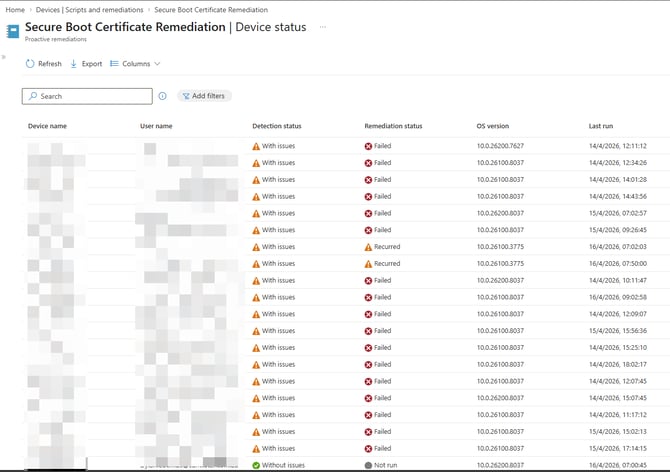
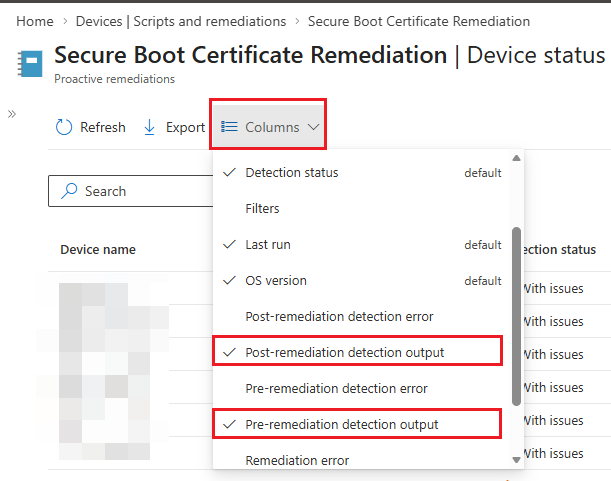
For the remediation script settings:
Deploying Registry (Opt-In)
For devices not managed by Intune or fallback when policy is not applied, you can set the opt-in the registry under HKEY_LOCAL_MACHINE\SYSTEM\CurrentControlSet\Control\SecureBoot and create the value MicrosoftUpdateManagedOptIn DWord is set to 1
$Name = "MicrosoftUpdateManagedOptIn"
$Value = 1
if (!(Test-Path $Path)) { New-Item -Path $Path -Force | Out-Null }
Set-ItemProperty -Path $Path -Name $Name -Value $Value -Type DWORD
Older devices need a firmware update
For devices that have been explicitly validated as exceptions (legacy or special-purpose systems that cannot take the update) use Configure High Confidence Opt Out. Do not enable opt-out as a general safety measure or those devices will miss required updates. Some older devices may need a firmware update from the OEM before it can accept the new certificates. If a device is opted in but has not received the update after a long period: confirm Secure Boot is enabled in UEFI, that Windows Update is working and the device has recent quality updates, and review UEFICA2023Error for codes. If firmware blocks the update, install the latest OEM firmware or document the device as an exception. Rely on Microsoft-managed opt-in for most devices so rollout timing is controlled by Microsoft and compatibility risk is reduced.
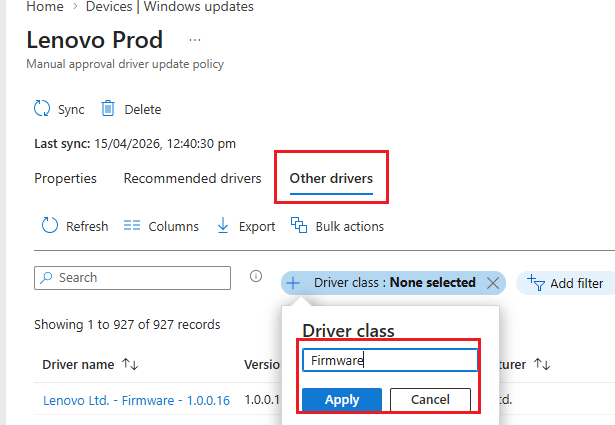
Deploying Driver Updates