![Full Logo.png]](https://help.devicie.com/hs-fs/hubfs/Full%20Logo.png?height=30&name=Full%20Logo.png)
Overview
The Devicie app is a background utility that Devicie uses to collect device compliance and telemetry datapoints, to help organisations understand the health and security compliance of their managed devices.
The collection and delivery process is designed to occur silently to the end user, with minimal impact to the Mac’s CPU or networking performance.
User Experience
As is the case for all applications that run as background processes or login items, users will see a notification prompt informing them that their organisation has deployed a managed application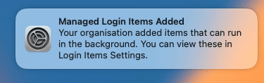 The Devicie app will run silently in the background, approximately every 12 hours.
Pre-requisites
macOS 15+
Troubleshooting Notes
Where is Devicie.app installed on Macs?
Devicie.app is installed in /usr/local/Devicie
How often does it collect telemetry information?
Approximately every 12 hours. This scheduled run is managed by the Mac’s launchd service, which is responsible for ensuring the Devicie.app carries out its tasks without impacting system performance.
How do I view Devicie.app logs?
You must be a local admin to view Devicie’s logs.
In Terminal, runlog show --predicate 'subsystem contains "com.devicie"'
Use the --info flag for more verbose results.
What is being deployed
Two policies need to be deployed - the app policy and a custom attribute script policy that is used for device verification.
Policy Name
Devicie App
Policy Type
macOS Pkg application
Recommended Assignment Targets
All Devices
Policy Settings
|
Setting |
Description |
Value |
|
|
If |
|
|
|
wed to by Intune to determine if the app is installed. |
|
Policy NameDevicie - Telemetry Publisher
Policy TypemacOS Custom Attribute Script
Recommended Assignment TargetsAll Devices
How to Deploy
The custom attribute script is created via Intune Portal.
Our support team can help provide you with the file for upload.