![Full Logo.png]](https://help.devicie.com/hs-fs/hubfs/Full%20Logo.png?height=30&name=Full%20Logo.png)
This knowledge base article provides step-by-step instructions on how to gather the log files from Microsoft Intune portal then navigate to gather the correct log files to gather the events to address.
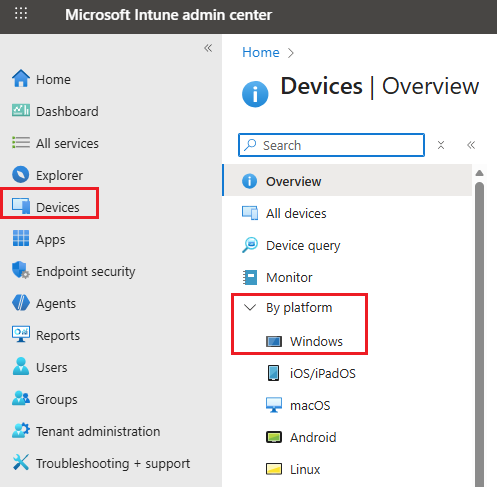
Navigate to https://intune.microsoft.com/, Select Devices then click on By platform then click on Windows
Search for the hostname of the device, then select Collect diagnostics

Select Yes when prompted.
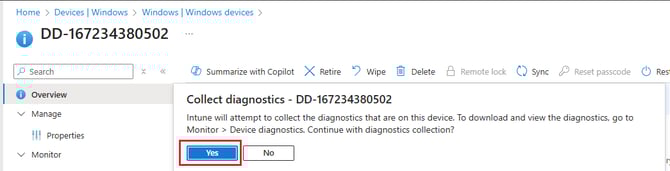
It will show up with "Collect diagnostics pending" - this is dependentpendant on whether the device is online.

Next it will display with "Collect diagnostics: completed"

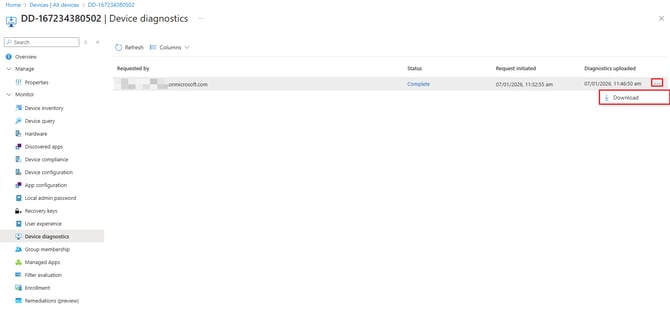
Go to Device Diagnostics tab on the left hand column, then select on the 3 dots then select Download.
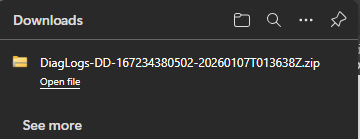
This will download the DiagLogs-Hostname-Date.zip like as per screenshot, extract it and open the files.
You can send over these log files to Devicie Support team.