![Full Logo.png]](https://help.devicie.com/hs-fs/hubfs/Full%20Logo.png?height=30&name=Full%20Logo.png)
* Features released to all customers with a “Preview” badge*
This release is focused on giving IT teams more control with less friction: making it easier to protect corporate data inside apps, find the right devices faster, and manage policy assignments with more clarity from within the Devicie portal.
1) App Protection Policies
Secure app data with a simpler deployment flow.
App Protection Policies (MAM) are now publicly available in the Devicie portal. Users can now deploy these policies using the same familiar flow as other Policy Templates: select the target tenant, choose groups or filters, enter the required variables, and deploy. Once deployed, App Protection Policies can also be managed directly in the portal, including updates to variables and assignments.
This makes it easier to apply policy-driven protection to corporate data inside apps without adding unnecessary admin overhead. It also gives teams a more consistent workflow, helping them move faster while keeping users productive.
2) Device Spotlight search
Find the right device faster, with less guesswork.
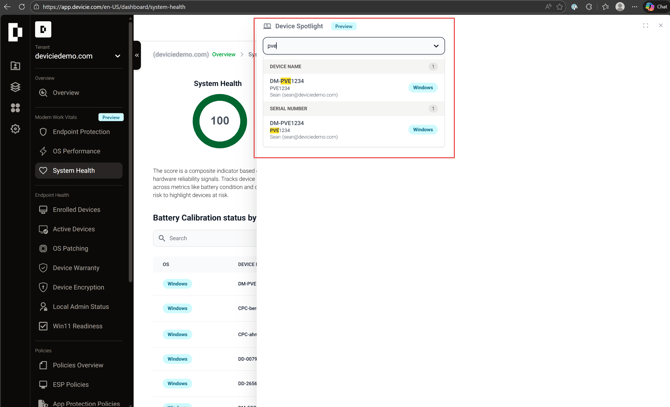
Device Spotlight search now groups results by Device Name, Email or Serial Number, with matching terms highlighted for quicker scanning. This makes it easier to locate the right device without second-guessing which identifier was used in the search.
For busy MSPs and IT teams, this means less time hunting through results and a faster path from search to action.
3) Enrollment Status Page (ESP) assignment clarity
A small UX change that reduces confusion.
The “exclude” option has been removed from ESP assignments because ESP behavior is driven by priority, not include/exclude logic. Since there is no true exclude concept in the ESP assignment model, showing that option was misleading.
This update helps make assignment behavior clearer and more intuitive, so administrators can make changes with greater confidence.
.png?width=670&height=408&name=Enrollment%20Status%20Page%20(ESP).png)
Want to see these in action?
These updates are available to preview. If you'd like a quick, no-obligation walkthrough, feel free to connect with our team and we’ll show you how App Protection Policies, Device Spotlight search, and the latest ESP improvements fit into your day-to-day operations.